Frequently Asked Questions
1. Is it free to create an account?
Yes, you can create an account for free by clicking the 'Create Account' button at the top of this page! The only information needed to create an account is your email address, first name, and last name.
2. How do I verify my email?
When you first create an account, we will send you an automated email to verify your email address. You must verify your email address before you can log in. Open the email and click on the link to verify your email.
3. How much does the software cost?
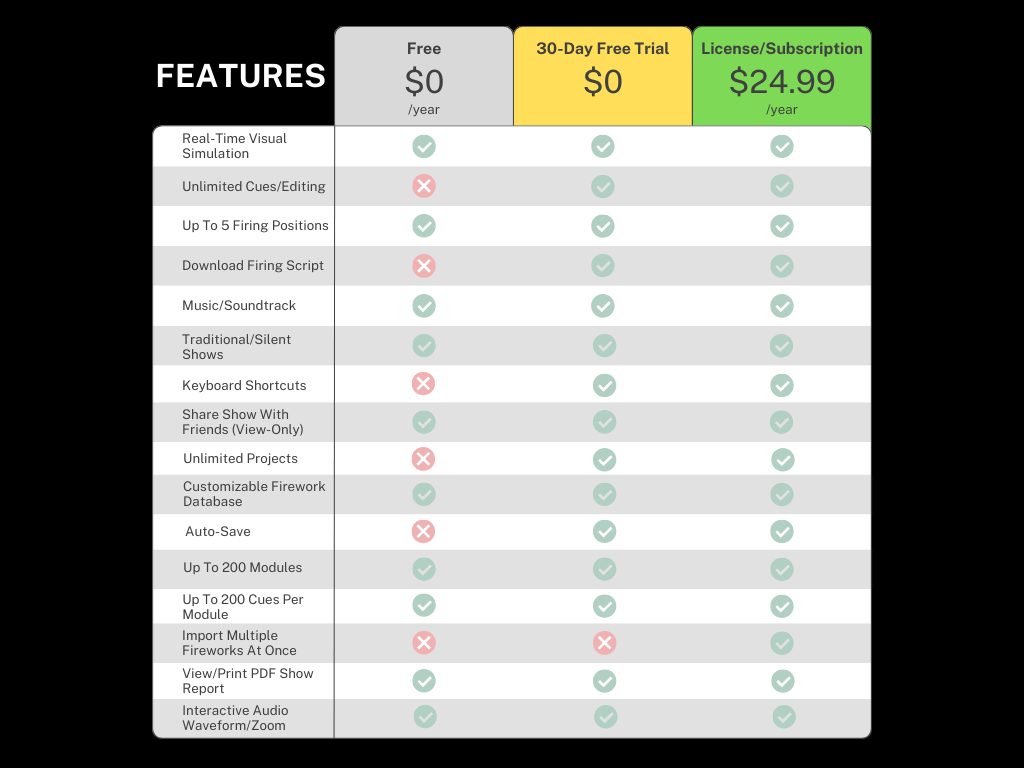
A 1 year license/subscription is $24.99 USD, processed through PayPal.
4. Is there a free trial?
Yes, when you create an account there is a 30 day free trial. After the free trial period ends, you can still use the software to view existing projects, but the software features will be limited without a 1 year license.
5. Is there a video tutorial about how to use the software?
Yes! See the video above.
6. What devices/browsers can I use the software on?
Any computer with a web browser can access the software, including Windows and Mac. Firework Show Creator software is designed to be used on a desktop or laptop computer using the Google Chrome or Safari web browser. It is not designed to be accessed on mobile devices.
7. Does the software support multiple firing positions?
Yes, you can have 1, 2, 3, 4, or 5 firing positions.
8. How many modules and cues can you have?
You can have up to 200 modules with up to 200 cues assigned to each module.
9. Can you create a traditional show without music?
Yes! You can create a traditional show by choosing the silent track option when you create a project.
10. Can you share your show video simulation with others?
Yes! Just click the share show link to share your show's video simulation with anyone in view-only mode.
11. How do I save changes in the software?
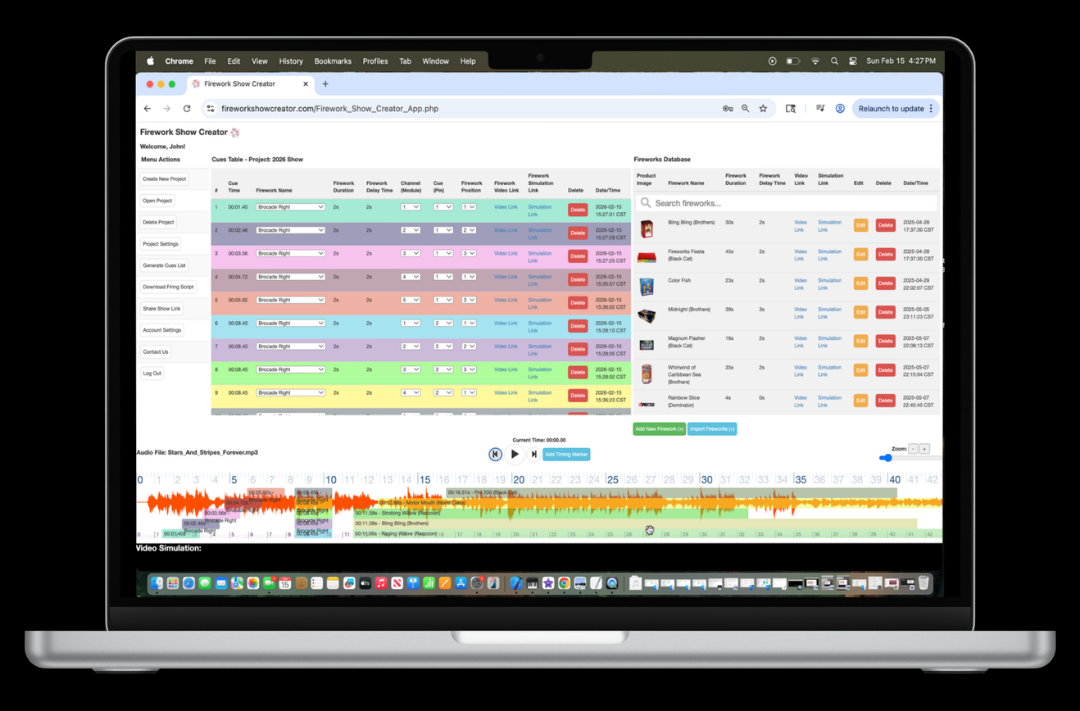
Adding cue timing markers, adjusting cue timings on the audio waveform, and selecting a firework for each cue are all saved in real-time, automatically. No need to worry about saving changes!
12. What type of audio file should I use?
You should use an MP3 audio file. We recommend using the free Audacity program to create a medley of all the songs you want to use in your firework show, and then export it as a single MP3 file. Ensure the MP3 audio file is exported from Audacity as a constant bit rate (CBR) MP3 file instead of a variable bit rate (VBR) MP3 file. This will ensure there is never a mismatch between the audio and the visual waveform.
13. How do I upload an audio file?
To add an audio file to your project, you first need to upload your audio file to your personal Dropbox account. Then, create a share link to the Dropbox audio file within your Dropbox account. Next, copy and paste the Dropbox link into the audio file field when creating or modifying a project in Firework Show Creator software.
14. There is a discrepancy between the audio I am hearing and the visual waveform. They seem out of sync. What should I do?
You should use an MP3 audio file and ensure the MP3 audio file is exported from Audacity as a constant bit rate (CBR) MP3 file instead of a variable bit rate (VBR) MP3 file. This will ensure there is never a mismatch between the audio and the visual waveform.
15. What fireworks does the software support?
The software supports any firework that you can find a YouTube video of. This includes both consumer and professional fireworks. The software is highly customizable in this regard! If you can't find a video on YouTube of the firework you want to use, you can create your own video and upload it to YouTube for use in the software. The sky is the limit!
16. How do I add my own fireworks to the firework database?
The software comes with a database of common fireworks of various types and manufacturers. To add your own fireworks to the database, click on the 'Add Firework (+)' below the Fireworks Database list. The software supports any firework that you can find a YouTube video of. This includes both consumer and professional fireworks. The software is highly customizable in this regard! If you can't find a video on YouTube of the firework you want to use, you can create your own video and upload it to YouTube for use in the software. With a premium yearly license, you can also click the 'Import Fireworks (+)' button to import all of your fireworks at once by uploading a .CSV file.
17. How do I view details about my account and yearly subscription?
To view details about your account and subscription status, click on the 'Account Settings' Menu button.
18. How do I pay for a yearly software license/subscription?
When you create an account, there is a 30 day free trial. After the free trial period ends, you can purchase a 1 year software license/subscription, processed through PayPal.
19. How do I view a list of all the timing cues?
To view a list of all the timing cues in a project, click on the 'Generate Cues List' Menu button.
20. How do I view/print a PDF report of all the timing cues?
To view/print a PDF report for your show, click on the 'Generate Cues List' Menu button and then click 'View/Print PDF Report.'
21. How do I download a firing script to load onto a firework controller?
To download a .CSV firing script, click on the 'Download Firing Script' Menu button. Then, choose your firing system.
22. How do I view/print labels?
To view/print labels for your show, click on the 'Generate Labels' Menu button. Labels should be printed on a standard Avery 5160 template.
23. How many projects can I create? Is there a limit?
There is no limit to the number of projects you can create within your account. We hope you have a blast!
24. Can I delete the demo project?
No, you cannot delete the demo project that comes standard with every account. The demo project is intended to help you learn what the software can do and help spark ideas for your own projects!
25. I forgot my account password. How do I reset it?
To reset your password, go to the login page and click on the 'Forgot Password?' link. We will send you an automated email with steps to reset your password. If you have any questions or experience any issues, feel free to contact us anytime.
26. I have a question that wasn't answered in the FAQ. Is there a contact form?
Absolutely! Click the 'Contact Us' button at the bottom of this page to send an email anytime.